RGB色彩模式描述了三种颜色通道,这三种通道组合在一起,便成了我们最终能看到的颜色。它能表示的颜色数目多到惊人,能涵盖人眼能感知的所有色彩范围。但是它无法表示颜色对人眼的吸引程度。那让我们回想以上两张图,我们是不是一下子就被亮丽的蓝色和黄色给吸引了?注意,我用了亮丽这个词。
那什么是亮丽?答案是色彩的饱和度,也就是鲜艳度。以及恰到好处的色彩明度,也就是色彩的亮度。以及足够多的色彩数目,也就是该颜色或者颜色族所代表的像素个数。
综合来看,就是色彩饱和度越高,越鲜艳,越能吸引眼球。适当的明度也有助于提高色彩吸引度,过低的话色彩很暗,过高的话色彩趋近白色,都会让人眼忽略。至于色彩数目就不用多言,肯定越多越好嘛!
对图片色彩模式有过研究的同学肯定能猜出来我要说什么了。没错,就是用HSL色彩模式评价提示。饱和度就是HSL中的S(saturation),明度就是HSL中的L(lightness)。Palette的给出的解法就是用颜色的S和L值以及像素个数去评价一种颜色的得分。
而为了满足不同的颜色提取需求(比如有人希望提取亮的颜色,有人希望提取饱和低的颜色),Palette把颜色目标分成了六种。高亮度的Light类,普通亮度的Normarl类,暗亮度的Dark类。高饱和的Vibrant类,低饱和的Mute类。它们自由搭配可以得出六种模式:
LIGHT_VIBRANT_MODE (高亮度高饱和类)

VIBRANT_MODE(普通亮度高饱和类)

DARK_VIBRANT_MODE(暗亮度高饱和类)

LIGHT_MUTED_MODE(高亮度低饱和类)

MUTED_MODE(普通亮度低饱和类)

DARK_MUTED_MODE(暗亮度低饱和类)
每种颜色目标模式都有自己独特的Target参数,也就是S和L越靠近这个Target值得分越高,最终再综合像素个数的得分,得分最高的颜色也就是我们在对应模式下要提取的目标颜色。
Tips:推荐颜色的逻辑是优先选VIBRANT_MODE下的颜色
如果该模式下没有识别出目标颜色,则会按照
MUTE_MODE
->
LIGHT_VIRANT_MODE
->
LIGHT_MUTE_MODE
->
DARK_VIBRANT_MODE
->
DARK_MUTE_MODE
的继承顺序进行传递。
Please open an issue if you want some new feature.
-
The iOSPalatte framework is a static framework,To avoid fail to load the category.You should add "-all_load" to your target "other linker flag" in the building settings.
-
Fix the memory leak.
-
When you use the default API:"getPaletteImageColor",you will get a null "allcolorDic" in your callback block.
-
"Showing the percentage of every color".Due to the issue.
Objective-C version of Google Palette algorithm in Java.A tool to extract the main color of a image.Compare to traditional algorithm,iOSPalette can help you extract the main color which is more likely to be "The Main Color".It is not always the largest in pixel numbers.
For Chinese user,you can tap the article iOS图片精确提取主色调算法iOS-Palette.It will be helpul.
1.It always help you to extract the color you want,no the largest in the pixel count.Just like this case:

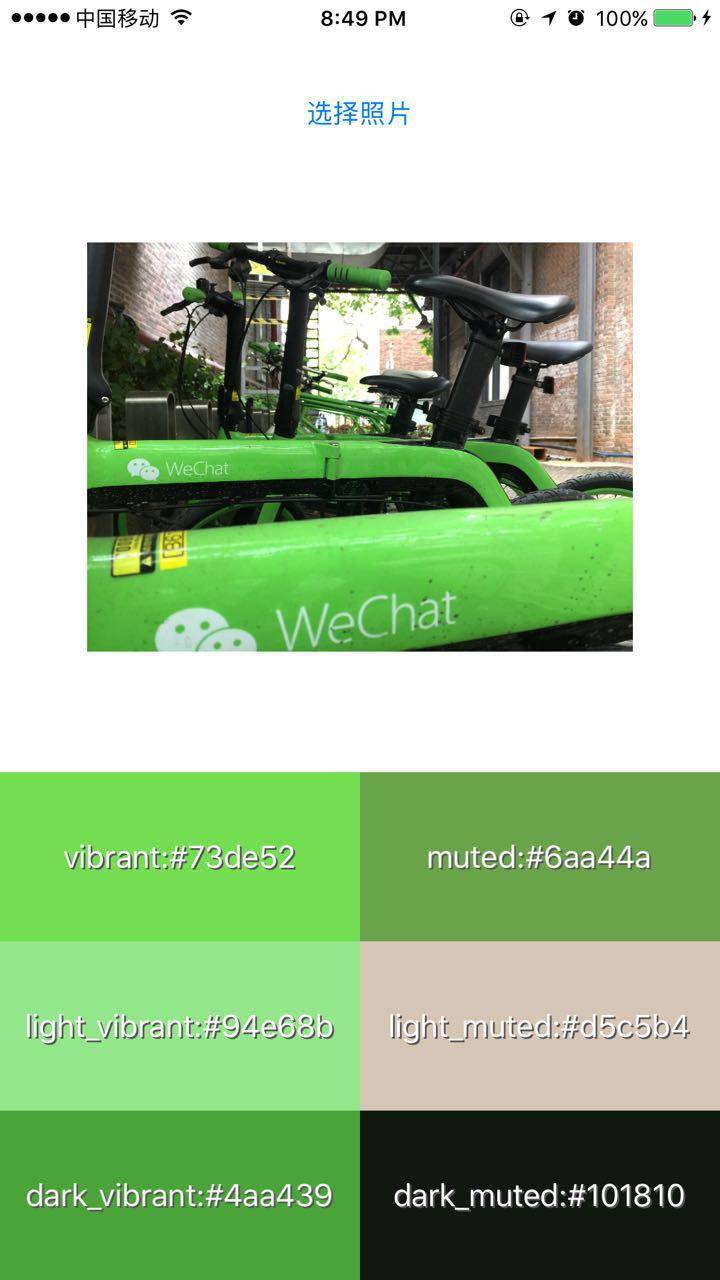
You can see the 6 TargetMode from the demo screenshot.They are distinguished by different Saturation and Lightness (According to HSL Color Mode).
LIGHT_VIBRANT_MODE (High Lightness , High Saturation)

VIBRANT_MODE(Normal Lightness , High Saturation)

DARK_VIBRANT_MODE(Dark Lightness , High Saturation)

LIGHT_MUTED_MODE(High Lightness , Low Saturation)

MUTED_MODE(Normal Lightness , Low Saturation)

DARK_MUTED_MODE(Dark Lightness , Low Saturation)
You can get every target mode color thourgh the iOSPalette API if you need!
2.It helps to combine every single RGB Value into a VBox,then calculate the most representational color.
You can get these simple API in Palette.h and UIImage+Palette.h:
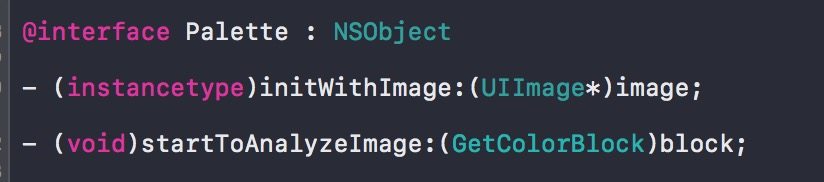

If you need all target mode info, you can use these API in Palette.h and UIImage.Palette.h:

Then you all get the callback with all color infomation you want:

Tips:The recommendColor is the color for the vibrant target.In case of null,It will be replaced by this order:MUTE_MODE------LIGHT_VIRANT_MODE ------LIGHT_MUTE_MODE------DARK_VIBRANT_MODE------DARK_MUTE_MODE.

Absolutely,you can change the order if you want different performance.
1.Before white background:
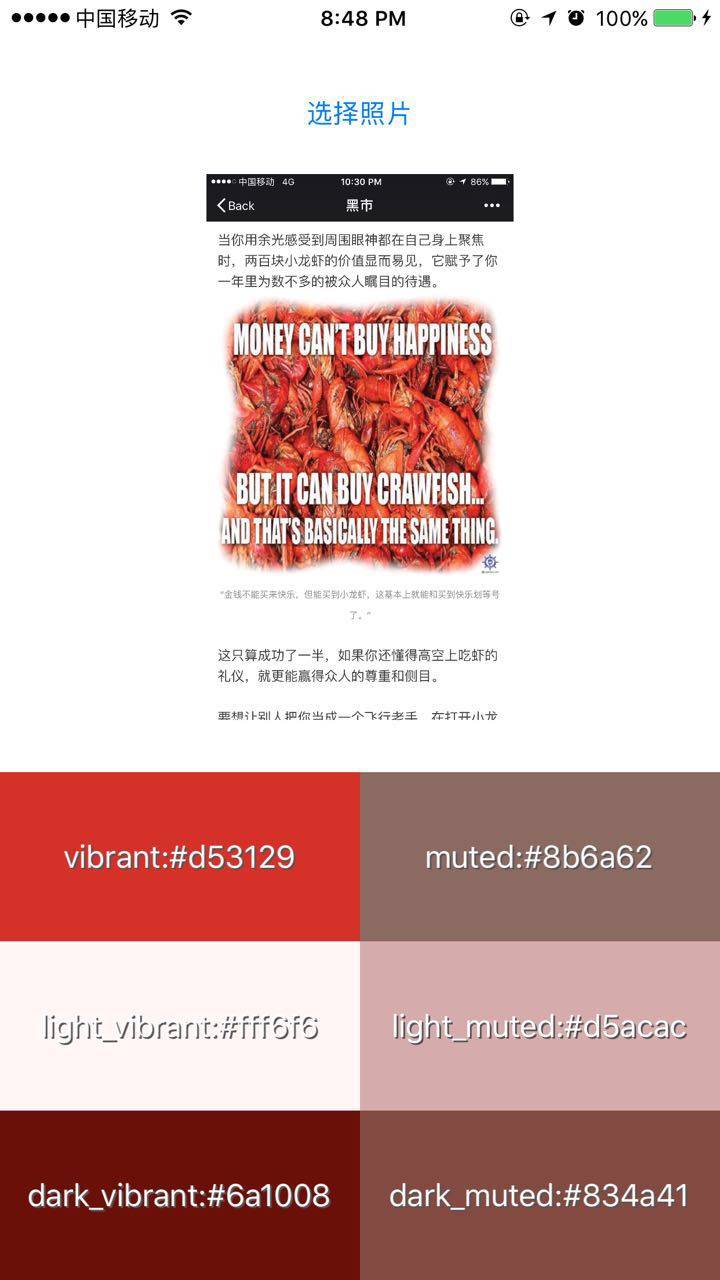
2.In the normal illumination:
if you have any question,you can contact me thourgh the contact infomation below.Or open a issue on Github.I will solve it as soon as possible!Best wishes!
Zhihu:知乎
Email:564531504@qq.com
简书:Tap Here